 VectorExpert
A contour job takes the points of a total station or DGPS survey from a CSV, TXT, XYZ, PTS or ASC file. CivilSurvey Expert joins them into a surface (a TIN), draws the contours at the interval you choose, and keeps every level live: change a point's R.L. in the Points sheet and the contours follow.
On the plan
What the Contour screen draws
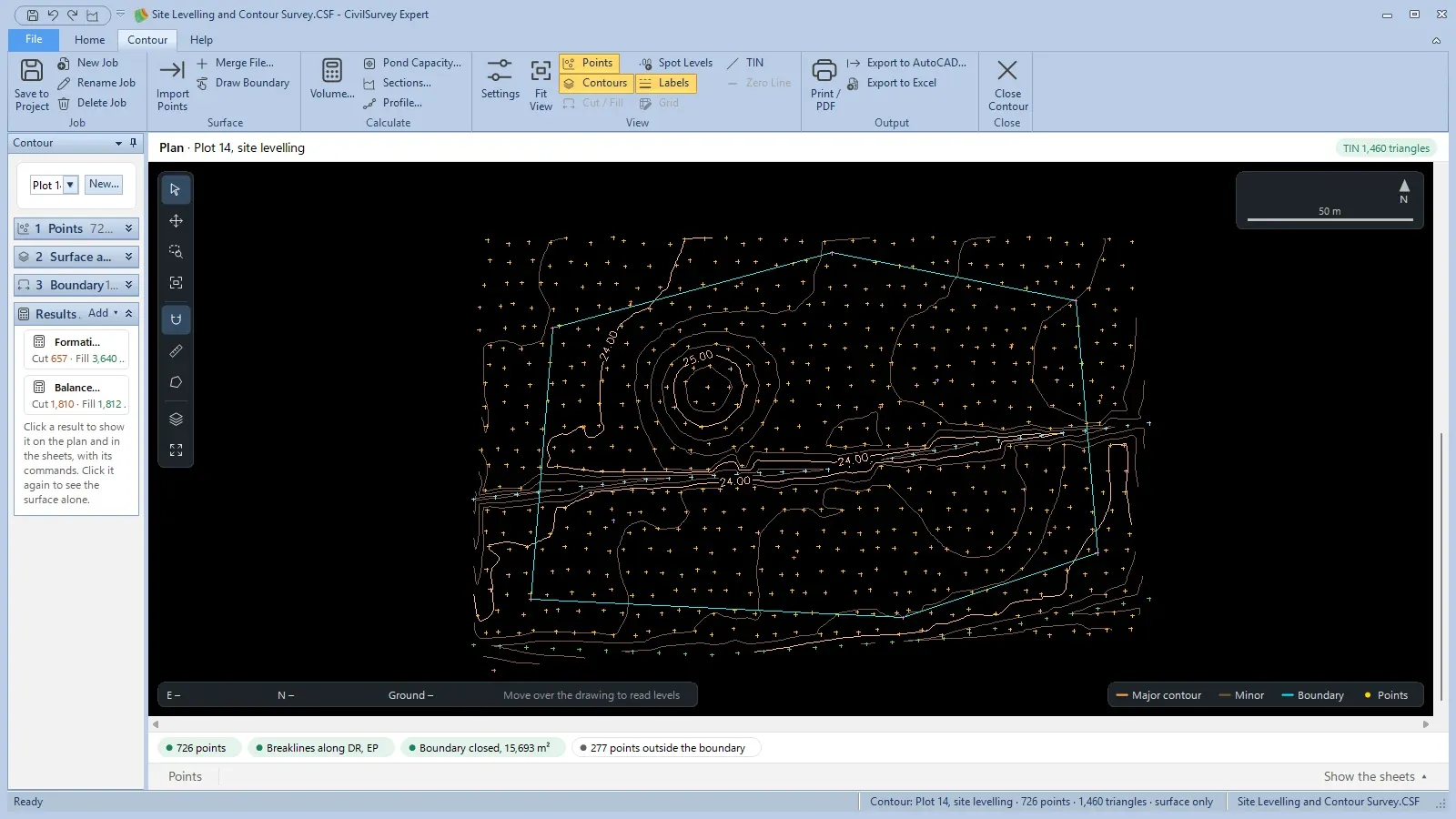
Minor contours at the interval and labelled major contours, drawn from the surveyed points (the crosses) inside the job's boundary.
Schematic plan, made-up levels.
How it works
In the app, step by step
- 01
Open the Contour screen
Home › View › Contour opens the Contour screen and its own ribbon tab. New Job… starts a contour job; one project holds as many jobs as you need, each saved with Save to Project.
Home › View › Contour - 02
Import the points
Import Points… reads the survey file and Merge File… adds a second one. A point under 5 cm in plan from an earlier one is merged into it, and the 1 Points fold says how many were.
Contour › Surface › Import Points… - 03
The surface and contours appear
The TIN and the contours are made as soon as the points are in. Tick a code under Join the points coded, such as a drain or a bank top, and its points become a breakline that no triangle crosses.
2 Surface and contours - 04
Set the boundary
Join the boundary pillars by their code (BND to start with), run the boundary round the outside of all the points, or draw it on the plan. Its area, perimeter and the points inside are shown.
3 Boundary Points coded · Outline · Drawn - 05
Choose the interval and labels
Contour Settings sets the interval, how often a major contour comes, smoothing, extra levels to draw bold (a full tank level, a road level) and where the labels go. Use for new jobs keeps them.
F8 Contour › View › Settings… - 06
Print or export
Print / PDF puts the plan on an A3, A2 or A1 sheet at a scale chosen so the boundary fits, with a legend, notes and the project's title block. Export to AutoCAD and Export to Excel are beside it.
Contour › Output
Details
Everything in contour plan
| Feature | What it does | Detail |
|---|---|---|
| Points | ||
| Point files | Total station or DGPS points: name, easting, northing, level and code | CSV · TXT · XYZ · PTS · ASC |
| Merge a second file | Adds the points of another survey file to the same job | Merge File… |
| Close points | A point under 5 cm in plan from an earlier one is merged into it; the panel says how many | < 5 cm |
| Points sheet | Point, easting, northing, R.L., remark and whether it is in the boundary. Change a level and the TIN updates at once. | Ctrl+Z undoes |
| Surface | ||
| TIN | The points joined into triangles in plan; each contour is worked out on the triangles | Delaunay triangulation |
| Breaklines | The points of one code joined in the order they were surveyed, so no triangle crosses a drain, a bank top or an edge of pavement | Join the points coded |
| Edges | Long triangles on the outside of the survey are left out | Longest triangle side · 50 m to start |
| Contours and labels | ||
| Interval | The height between one contour and the next | 0.10 · 0.20 · 0.25 · 0.50 · 1 · 2 · 5 m |
| Major contours | Every so many contours is bolder and labelled | Major contour every |
| Smoothing | A curve that still passes through every true level; the volumes don't change | Smooth the lines |
| Extra levels | Levels drawn bold in their own colour and labelled, such as a full tank level | Also draw these levels |
| Labels | Along the line every so many mm on the sheet, at the middle of each line, or at both ends, with the line broken under the text | Major · All · None |
| View | Points, contours, spot levels, labels and the TIN switch on and off from the ribbon | Contour › View |
| Output | ||
| Print / PDF | The plan with a north arrow and scale bar, the legend, notes and the project's title block | A3 · A2 · A1 · 1:100 to 1:2500 |
| Export to AutoCAD | Real eastings and northings, contours as polylines at their own level, points at their R.L., each part on its own layer | DXF · DWG · CONTOUR_MAJOR · CONTOUR_MINOR |
| Export to Excel | The Points sheet, and the sheets of the result shown | .xlsx |
On screen
What you'll see
Common questions
Which instruments does the contour plan work with?
Any that can save its points as a text file. Import Points reads CSV, TXT, XYZ, PTS and ASC files from a total station or a DGPS survey, and Merge File adds a second file to the same job.
Can I correct a wrong level after the contours are drawn?
Yes. Type the new R.L. in the Points sheet: the surface and the contours are made again at once, and Ctrl+Z undoes it.
How do I stop contours cutting across a drain or a bank top?
Survey it as points of one code and tick that code under Join the points coded. The points are joined in the order they were surveyed, and no triangle crosses the line.
Does smoothing the contours change the quantities?
No. Smoothing changes only the drawing: the curve still passes through every true level worked out on the triangles, and volumes are always worked out on the TIN itself.
Do I need AutoCAD for the contour plan?
No. The plan prints to paper or PDF from CivilSurvey Expert with your title block. Export to AutoCAD is there when someone else needs the drawing as DXF or DWG.