 VectorExpert
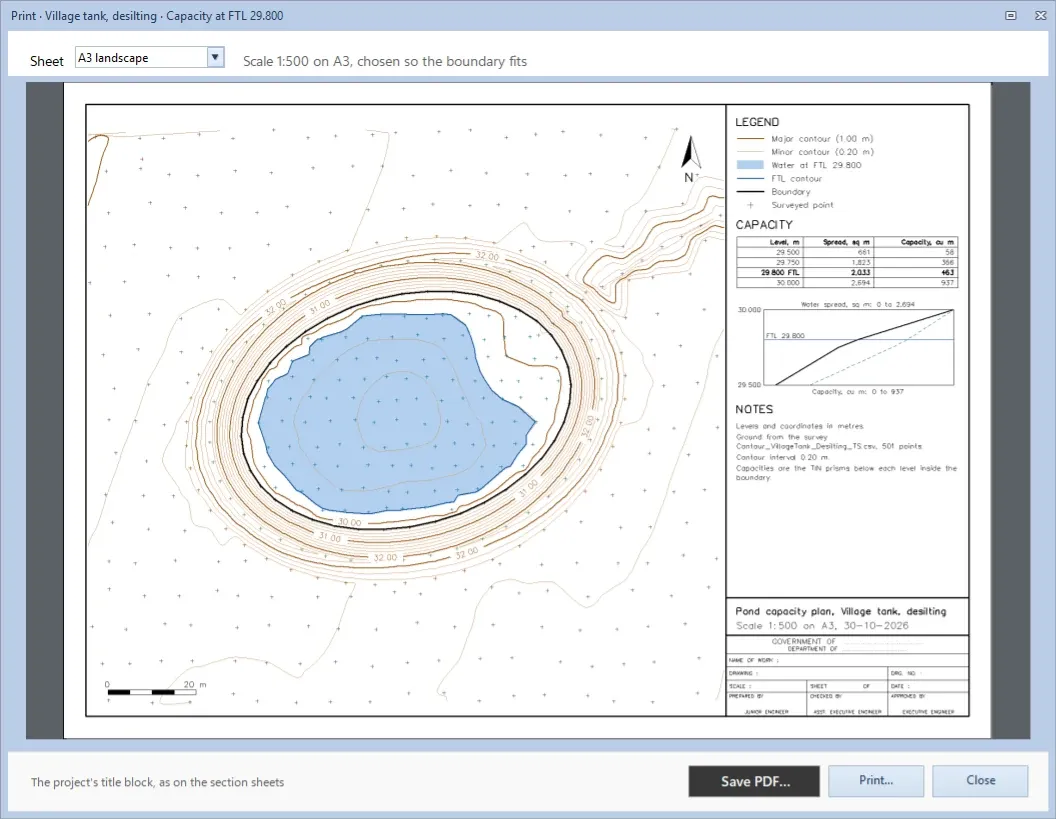
Pond Capacity works out the water a tank or pond holds, and its water spread, at each level inside a boundary. Every level is worked out from the surface itself rather than by a rule between levels, and the printed plan carries the capacity table and the area–capacity curve.
On the plan
What the Contour screen draws
The water up to the full tank level is shaded and its edge drawn as the FTL contour. The boundary runs along the inner toe of the bund.
Schematic plan, made-up levels.
How it works
In the app, step by step
- 01
Set the boundary
Usually the tank's inner toe, joined from points of one code. To go up the inner face of the bund, draw a boundary along its top for this result alone.
3 Boundary - 02
Open Pond Capacity…
From Add in Results, or the Calculate group. From starts at the bed rounded up to the step; To at the boundary's lowest point, so the water stays inside.
Contour › Calculate › Pond Capacity… - 03
Type the FTL
As you type, the banner gives the capacity in m³ and ML and the water spread in m² at that level, with the number of levels.
FTL · Every - 04
Watch for a spill
An FTL above the boundary's lowest point shows an amber warning: the water would spill there. The same words go in the checks strip and on the print.
Checks strip - 05
Read the Capacity sheet
One row a level: the water spread, the volume of the step, and the capacity in m³ and ML. The FTL's row is in bold.
Show the sheets › Capacity - 06
Print the capacity plan
The plan with the water at the FTL and the FTL contour, the CAPACITY table and the area–capacity curve, on an A3, A2 or A1 sheet.
Contour › Output › Print / PDF…
Details
Everything in tank capacity
| Feature | What it does | Detail |
|---|---|---|
| Levels | ||
| From and To | From starts at the bed rounded up to the step (Use it puts it at the bed itself); To at the boundary's lowest point | From · To |
| Step | The interval between levels in the table | 0.10 · 0.25 · 0.50 m |
| Full tank level | Marked in the Capacity sheet and drawn on the plan; leave it empty and the figures are at the top level | FTL |
| Live FTL | Click the FTL over the plan, type another and press Enter: the pond is worked out again | FTL in the bar |
| Limit | Up to 500 levels in one result | ≤ 500 levels |
| Calculation | ||
| Capacity | The volume below each flat level inside the boundary, worked out on the TIN, as the Volume dialog works out fill | TIN prisms |
| No rule between levels | Each level is exact from the surface, so there is no average end area or prismoidal error between levels | Exact at every level |
| Spill check | Warns when the FTL is above the boundary's lowest point, where the water would run out | Boundary's lowest point |
| Output | ||
| Capacity sheet | Level, water spread, volume of the step, and capacity in m³ and ML | Capacity · Summary |
| Capacity plan | The water at the FTL, the FTL contour, the CAPACITY table, the area–capacity curve, notes and the title block | A3 · A2 · A1 · PDF |
| AutoCAD | The water and its edge, each on its own layer | WATER · FTL_CONTOUR |
| Excel | The Points, Capacity and Summary sheets | .xlsx |
On screen
What you'll see
Common questions
How is the capacity at each level worked out?
On the surface itself: the volume below a flat level inside the boundary, triangle by triangle. It is the same figure the Volume dialog would give as fill at that level.
Why not use the average end area rule between contour areas?
Because it is not exact. In the user guide's worked example, a pond shaped like an upside-down pyramid, the average end area rule comes out 2.6% high for a 1 m step. Working each level out from the TIN leaves no rule between levels to go wrong.
What if the FTL is above the lowest point of the bund?
The dialog warns that the water would spill there, and the warning goes in the checks strip and on the printed sheet too. Lower the FTL, or give the result a boundary along the top of the bund.
Can I get the capacity in million litres?
Yes. The banner and the Capacity sheet give the capacity in m³ and in ML, with the water spread in m² at every level.
Can I work out a desilting quantity as well?
Yes. A volume against the bed level gives it, as in the Village tank, desilting job of the sample project.